
Python Keywords
If you are trying to learn a programming language, you need to have a basic idea of "What are keywords" and "How they are used".
You can learn about keywords in python, syntaxes, usages, and how to implement them while executing codes. Keywords are defined as words, which are pre-defined and reserved words that have a specific meaning and purpose of use. If you want to solve some basic python programs or learn the basics of python, you should go through this whole article.
These keywords cannot be used as variables. There are 35 keywords in python as of version 3.8.
We can run the below command to find the words, which are already reserved.
help(" keywords")
Below is a list of the Python keywords.
False class from or
None continue global pass
true def if raise
and del import return
as elif in try
assert else is while
async except lambda with
await finally nonlocal yield
break for not
And if we want to learn more about any keyword, we can specify the keyword in help () for which we need more information.
The command goes like this.
Example: help(” return”)
It will return the use and where to pass in the syntax to be syntactically correct.
There are two helpful members that will be dealing with the keywords.
1. Kwlist will provide the list of keywords that are in use in a particular version.
2. Iskeyword () will help to find if a string is defined as a keyword or not.
Below is given the details of keywords and their usage:
THE KEYWORD “and”
"and" is used to find out if both the expressions before and after are true or false.
For example, <exp1> and <exp2>
if both exp1 and exp2 are true, the output will be true. If either of them is false, then the result will be false.
"and" will not return the Boolean value like operands. Rather it will return exp1 if it is false, or it will return exp2.
If we are particular to get the result and whether it is true or false, we need to check it by passing the result as bool (), or we can use a conditional if statement.
You can have a look at the following code to understand and keyword.
Program:
a=10
b=15
if (a==10 and a+b>20):
    print (“this is and keyword”)
else:
    print (“condition is not true”)
Output
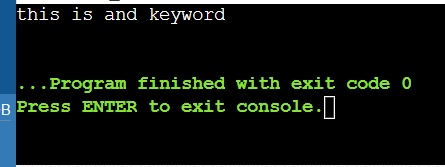
When you execute the above code, you can see the following output "this is and keyword" you get this output because both the conditions are given are true.
Similarly, if you pass any false condition, then you will see the following output "condition is not true".
THE KEYWORDS if AND else
"if" is the control flow keyword used to execute a conditional statement. The "if" keyword will allow you to execute the block of code only if after the expression given in the "if" is true.
"else" will indicate that a block must be executed only if a condition mentioned in "if" is false. An "else" without "if" cannot exist.
Program:
a=10
b=15
if (a+b>20):
    print (“this is if block”)
else:
    print (“this is else block”)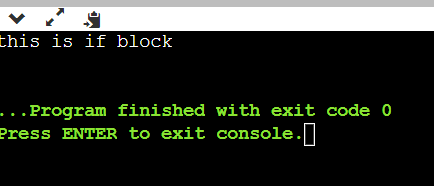
You can clearly understand the python if and else statement with the help of the above code.
You can clearly observe that if the condition in the if block is satisfied, you will see the output "this is if block".
If the condition in the "if" block is not satisfied, you can see the following output "this is else block".
"if" can be used individually, or it can be used with an "if" followed by the "else" keyword.
The condition goes like this,
Example:
if<exp1>:
      <statements>
You can see the below code to understand the usage of the "if" statement without using the "else" statement.
Program:1
a= “Hello”
if(a==“Hello”):
     print(“welcome to programming world”)
Output
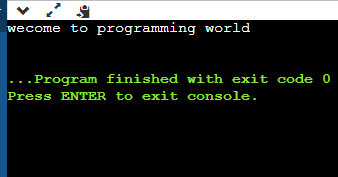
Program:2
a= input()
if(a==“compiletimeinput”):
     print(“welcome to programming world”)
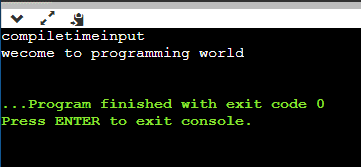
You can also use "nested if" statements if you want to perform multiple actions.
Example:
if <exp1>:
                      if<exp2>:
                             <statements>
                 else:
                        <statements>
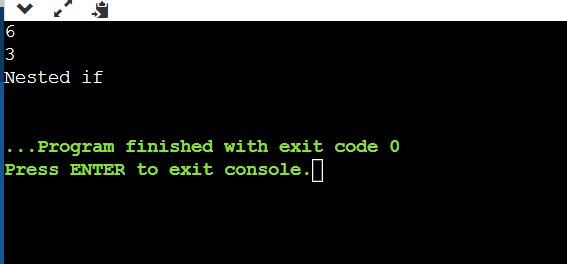
You can check the following code for the implementation of "nested if" statements.
If the condition in the first if statement is true, then only the second if statement will be executed. If not, the compiler will come out of the statement and executes the rest.
If the condition in the second if statement is true, then the compiler performs the task inside the second if statement.
Program:
a=int(input())
b=int(input())
if(a>b):
    if(a+b>0):
           print(“nested if”)
else:
    print(“try again’)
The keyword elif
Elif can be used to verify if at least one condition mentioned in the set of conditions is true, and if any condition is true, then it will return the output of the block of code written in that elif block.
Else it can only be used after at least 1 if condition. An elif without it doesn't exist.
Multiple elif conditions can be used after the if condition.
Example:
if<exp1>:
                       <statements>
                elif<exp2>:
                        <statements>
                 ….
else:
                     <statements>
Refer to the below code to understand the working of "elif" statements. When there is multiple conditions or set of conditions, instead of using "if", you can use "elif".
This code prints different outputs based on the conditions provided in each block of statements.
Program:
a=int (input ())
b=int (input ())
if(a+b>0):
      print (“both are positive or at least one negative and the other is higher positive”)
elif (a+b<0):
      print (“both are negative or at least one has higher negative value”)
elif (a+b==0):
      print (“either both are 0 or both are off opposite sign”)
else:
      print (“nothing to output”)
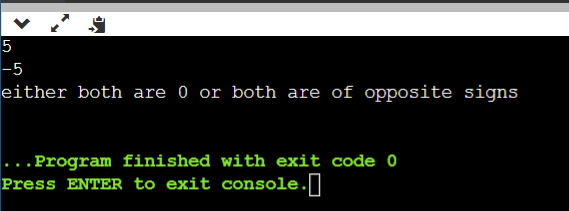
If the sum of values of "a" and "b" are positive, then you will see the following output "both are positive".
If the sum of values of "a" and "b" are negative, then you will see the following output "both are negative or at least one has a higher negative value".
If the sum of values of "a" and "b" are zero, then you will see the following output "either both are 0 or both are of opposite signs".
This is how "if elif" and "else" statements work when there are multiple sets of conditions.
These are the basic keywords which are required by each programmer or any person who wants to learn to program.
These are some of the basic example codes to learn the working of keywords and their functions in writing codes. If you are a beginner, you can learn about keywords and start writing some simpler codes using these keywords.
You can try to check whether a given number is even or odd, separating students of a class by grade-wise and checking whether a person is eligible for voting or not.
These are some of the basic programs to get familiar with python and some basic python keywords.